The documentations on the Langchain site and also on the Microsoft site seems to be outdated with the introduction of the Azure Foundry (new) interface. So for setting up a Langchain model the URLs are a bit different.
The process for configuring LangChain to work with Azure’s AI models has recently changed due to the introduction of the new Azure Foundry interface. If you’ve found that the documentation on the LangChain site or older Microsoft documentation is leading to errors, the core issue is likely an outdated endpoint URL structure.
🔗 Identifying the Correct Azure Endpoint
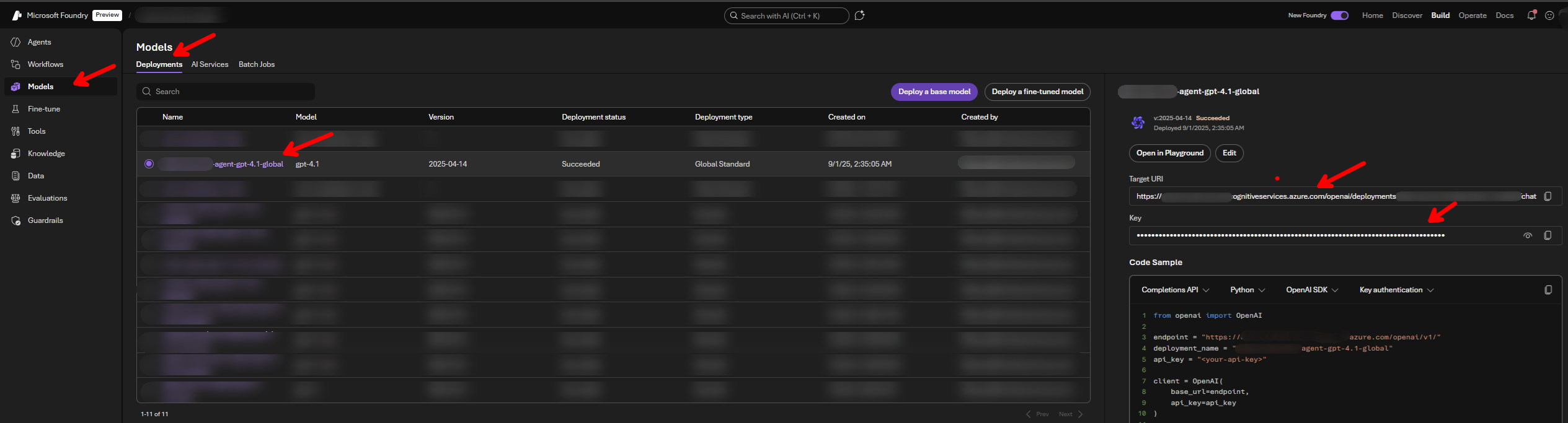
The key change is in the required format for the model endpoint.
| Status | URL Type | Old/New Format | Example Structure |
|---|---|---|---|
| ❌ Outdated | LangChain Docs | Old | https://{your-resource-name}.services.ai.azure.com/openai/v1 or https://{your-resource-name}.services.ai.azure.com/models |
| ❌ Incorrect | Found in Azure Foundry (New) API call | Incorrect for LangChain | https://{your-resource-name}.cognitiveservices.azure.com/openai/deployments/{your-deployment-name}/chat/completions?api-version=2024-05-01-preview |
| ✅ Correct | Required for LangChain | New | "https://{your-resource-name}.cognitiveservices.azure.com/openai/deployments/{your-deployment-name}/" |
The correct endpoint for use with the langchain-azure-ai package must end after the deployment name
💻 LangChain Python Usage Example
The following code demonstrates how to correctly set up the necessary environment variables and initialize an agent using the AzureAIChatCompletionsModel class with the new endpoint format.
Prerequisites
You will need the langchain and langchain-azure-ai libraries installed.
pip install langchain langchain-azure-ai
Python Code
from langchain_azure_ai.chat_models import AzureAIChatCompletionsModel
from langchain.agents import create_agent
import os

os.environ["AZURE_AI_CREDENTIAL"] = (
    "THE KEY THAT AZURE FOUNDRY AI GIVES"
)
os.environ["AZURE_AI_ENDPOINT"] = (
    "https://<<PROJECT NAME>>.cognitiveservices.azure.com/openai/deployments/<<DEPLOYMENT NAME>>/"
)
os.environ["DEPLOYMENT_NAME"] = (
    "<<DEPLOYMENT NAME YOU GIVE TO THE MODEL>>"
)


def get_weather(city: str) -> str:
    """Get weather for a given city."""
    return f"It's always sunny in {city}!"


llm = AzureAIChatCompletionsModel(
    endpoint=os.environ["AZURE_AI_ENDPOINT"],
    credential=os.environ["AZURE_AI_CREDENTIAL"],
    model=os.environ["DEPLOYMENT_NAME"],
)

agent = create_agent(
    model=llm,
    tools=[get_weather],
    system_prompt="You are a helpful assistant",
)

# Run the agent
result = agent.invoke(
    {"messages": [{"role": "user", "content": "what is the weather in sf"}]}
)
print(result)